Barclays · statement conversion
Convert Barclays bank statements to Excel, Xero or QuickBooks
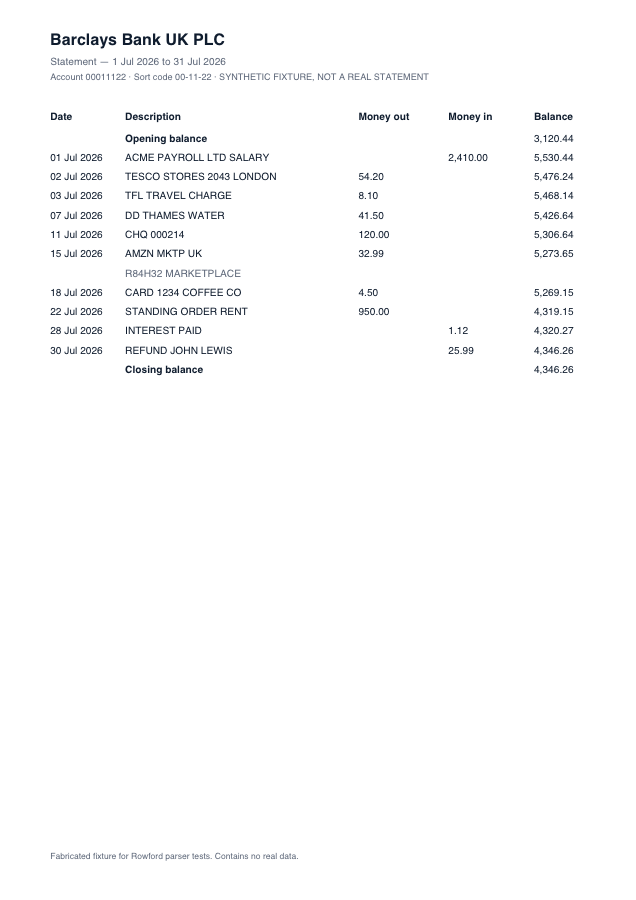
Barclays PDF statements keep a classic five-column ledger: dated rows with separate Money out and Money in columns and a running balance on every line. That running balance is a gift for verification — Rowford recomputes it row by row and refuses to call the extraction good until opening + transactions = closing, to the penny.
Full preview & reconciliation free · export from $39 one-time · nothing uploaded
How Rowford reads a Barclays statement
The Barclays template matches the columns as Barclays prints them — separate money-in and money-out columns folded into one signed amount for export:
DateDescriptionMoney outMoney inBalance
- Money out and Money in are separate unsigned columns; Rowford folds them into one signed amount (out = negative) so every export format gets the sign convention it expects.
- Longer merchant narratives wrap onto a second line below the row — the parser detects continuation lines (text with no date, amounts or balance) and merges them into the transaction above.
- Dates print as "02 Jul 2026"; they are parsed to ISO internally and re-formatted per export target (dd/mm/yyyy for Xero, QuickBooks, Sage and FreeAgent).
What ends up in your export
Date (re-formatted per target: dd/mm/yyyy for Xero, QuickBooks, Sage and FreeAgent), the full description as printed, the signed amount, and — in the generic CSV and Excel formats — the running balance. Every row carries a confidence score in the preview, and the whole statement must reconcile (opening + transactions = closing) before you rely on it. Deterministic, template-based extraction: the same statement produces the same output, every time.
Barclays questions
Which Barclays statements work?
PDF statements downloaded from Barclays online banking or the app — current accounts, savings and Business current accounts that use the Money out / Money in ledger layout. Paper statements that were scanned or photographed have no text layer and are declined rather than guessed at.
Does the Barclays running balance get checked?
Yes — every row. Barclays prints a balance on each line, so Rowford verifies that each balance follows from the previous one and that the whole statement reconciles from opening to closing. Any row that breaks the chain is flagged for review.
Can I send Barclays transactions straight into Xero?
Export as the Xero preset and you get a CSV with Date, Amount, Payee, Description and Reference columns, dd/mm/yyyy dates and signed amounts — the layout Xero’s bank-statement import expects for UK organisations.