Monzo · statement conversion
Convert Monzo bank statements to Excel, Xero or QuickBooks
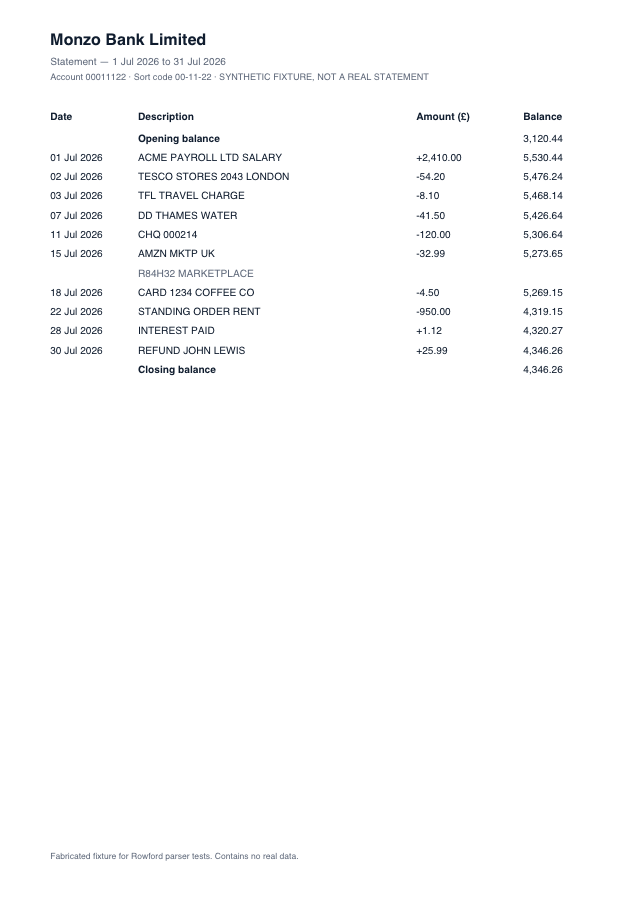
Monzo, born app-first, skips the traditional two-column money in/out ledger entirely: its PDF statements print one signed Amount column — payments negative, deposits positive. Rowford’s Monzo template reads the sign directly from the statement, and cross-checks every amount against the running balance so a stray minus can never slip through.
Full preview & reconciliation free · export from $39 one-time · nothing uploaded
How Rowford reads a Monzo statement
The Monzo template matches the columns as Monzo prints them — a single signed amount column, with the sign verified against the running balance:
DateDescriptionAmount (£)Balance
- One signed Amount column instead of in/out pairs — the sign comes from the statement itself, and the balance delta confirms it row by row.
- Monzo’s emoji-free export descriptions parse cleanly; where a description does contain characters a target format forbids, only that preset strips them.
- Pots transfers appear as ordinary transactions and are included — flag-and-review, never silently dropped.
What ends up in your export
Date (re-formatted per target: dd/mm/yyyy for Xero, QuickBooks, Sage and FreeAgent), the full description as printed, the signed amount, and — in the generic CSV and Excel formats — the running balance. Every row carries a confidence score in the preview, and the whole statement must reconcile (opening + transactions = closing) before you rely on it. Deterministic, template-based extraction: the same statement produces the same output, every time.
Monzo questions
Which Monzo statements work?
PDF statements exported from the Monzo app or web (personal and business) with the signed Amount column. CSV exports from Monzo are a different animal — Rowford reads the PDF statements a bookkeeper is typically sent.
How are signed amounts different for conversion?
Two-column statements say direction by position; Monzo says it with a sign. Rowford verifies the printed sign against the running balance movement, so a misread minus is caught by arithmetic rather than trusted.
Do Monzo Pots transfers appear in the export?
Yes, as the ordinary transactions Monzo prints them as. Exclude them in your bookkeeping software if your workflow treats Pots as internal transfers.