Lloyds · statement conversion
Convert Lloyds bank statements to Excel, Xero or QuickBooks
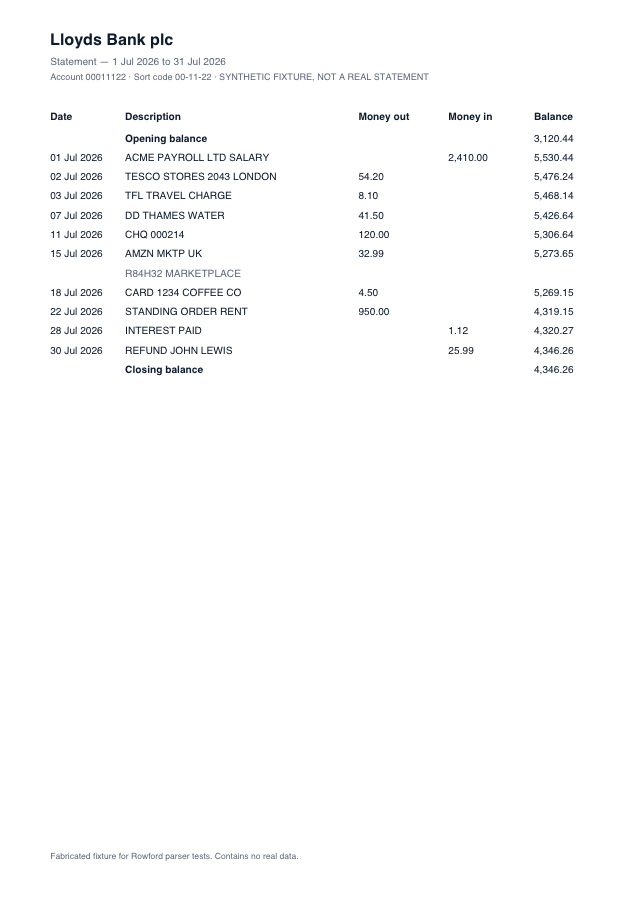
Lloyds statements pair a Money out / Money in ledger with fairly dense description text — standing orders, direct debits and card payments often carry long references that wrap onto a second line. Rowford’s Lloyds template merges those wrapped lines back into their transaction, so descriptions survive intact into Xero, QuickBooks, Sage or FreeAgent.
Full preview & reconciliation free · export from $39 one-time · nothing uploaded
How Rowford reads a Lloyds statement
The Lloyds template matches the columns as Lloyds prints them — separate money-in and money-out columns folded into one signed amount for export:
DateDescriptionMoney outMoney inBalance
- Wrapped description lines (no date, no amounts) are merged into the row above, with the merge noted in that row’s confidence detail.
- Money out / Money in fold into signed amounts; the running balance column is verified line by line.
- Rows where the printed balance does not follow from the previous row are marked for review rather than silently accepted — on Lloyds statements this most often means a wrapped line was actually a separate transaction, which the mapping view makes easy to check.
What ends up in your export
Date (re-formatted per target: dd/mm/yyyy for Xero, QuickBooks, Sage and FreeAgent), the full description as printed, the signed amount, and — in the generic CSV and Excel formats — the running balance. Every row carries a confidence score in the preview, and the whole statement must reconcile (opening + transactions = closing) before you rely on it. Deterministic, template-based extraction: the same statement produces the same output, every time.
Lloyds questions
Which Lloyds statements work?
PDF statements downloaded from Lloyds online banking — personal, Club Lloyds and business accounts using the Money out / Money in layout. Scanned paper statements are declined.
Long payment references get cut off in other tools — here too?
No. Wrapped reference lines are merged back into their transaction, and no export format truncates them except Xero’s own 500-character description limit, which Rowford applies only for the Xero preset.
Can I get Lloyds transactions into FreeAgent?
Yes — the FreeAgent preset produces their documented three-column CSV (date, amount, description; no header row; commas stripped), which uploads directly as a statement.