NatWest · statement conversion
Convert NatWest bank statements to Excel, Xero or QuickBooks
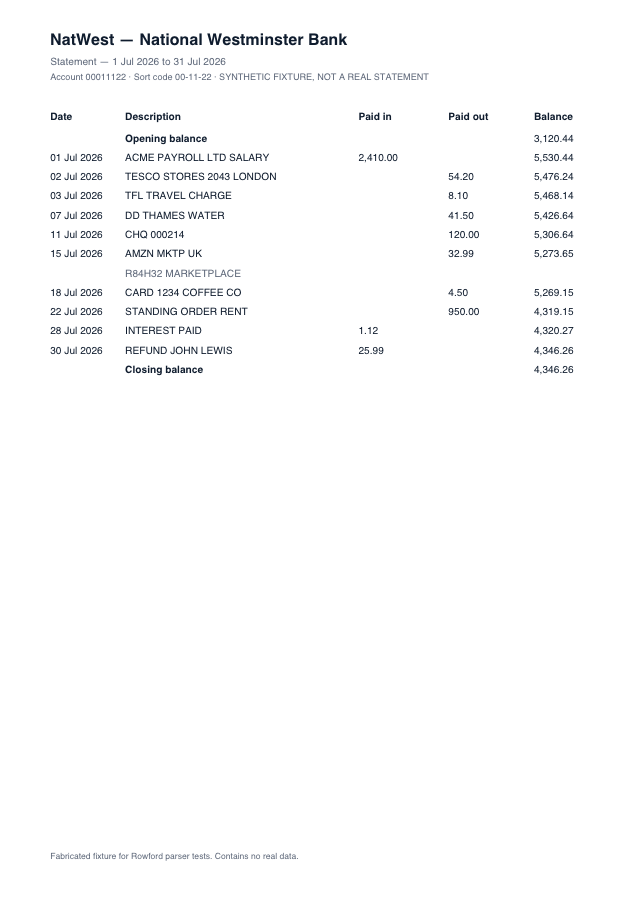
NatWest statements use Paid in / Paid out columns — and, unlike most of the high street, frequently print the Paid in column first. Column order is exactly the kind of thing that silently breaks naive converters; Rowford assigns columns by their printed headers, not their position, so NatWest’s ordering parses correctly either way round.
Full preview & reconciliation free · export from $39 one-time · nothing uploaded
How Rowford reads a NatWest statement
The NatWest template matches the columns as NatWest prints them — separate money-in and money-out columns folded into one signed amount for export:
DateDescriptionPaid inPaid outBalance
- Columns are matched by header text (Paid in / Paid out), not position — the template is immune to the in-before-out ordering NatWest favours.
- If a column is still ambiguous on an unusual account format, the mapping controls above the preview let you reassign it in two clicks, and the reconciliation check confirms the result.
- Paid in / Paid out fold into signed amounts for every export preset.
What ends up in your export
Date (re-formatted per target: dd/mm/yyyy for Xero, QuickBooks, Sage and FreeAgent), the full description as printed, the signed amount, and — in the generic CSV and Excel formats — the running balance. Every row carries a confidence score in the preview, and the whole statement must reconcile (opening + transactions = closing) before you rely on it. Deterministic, template-based extraction: the same statement produces the same output, every time.
NatWest questions
Which NatWest statements work?
Digital PDF statements from NatWest online banking — personal and business accounts on the Paid in / Paid out layout. Scanned statements are refused rather than guessed.
Why do other converters swap NatWest debits and credits?
Tools that assume money-out comes before money-in break on NatWest’s column order. Rowford reads the printed headers and maps each column by name, then proves the result against the running balance before you export.
Does the QuickBooks 4-column export handle NatWest correctly?
Yes — Paid in becomes the Credit column and Paid out becomes Debit, both positive, exactly as QuickBooks Online’s 4-column CSV import expects.