Halifax · statement conversion
Convert Halifax bank statements to Excel, Xero or QuickBooks
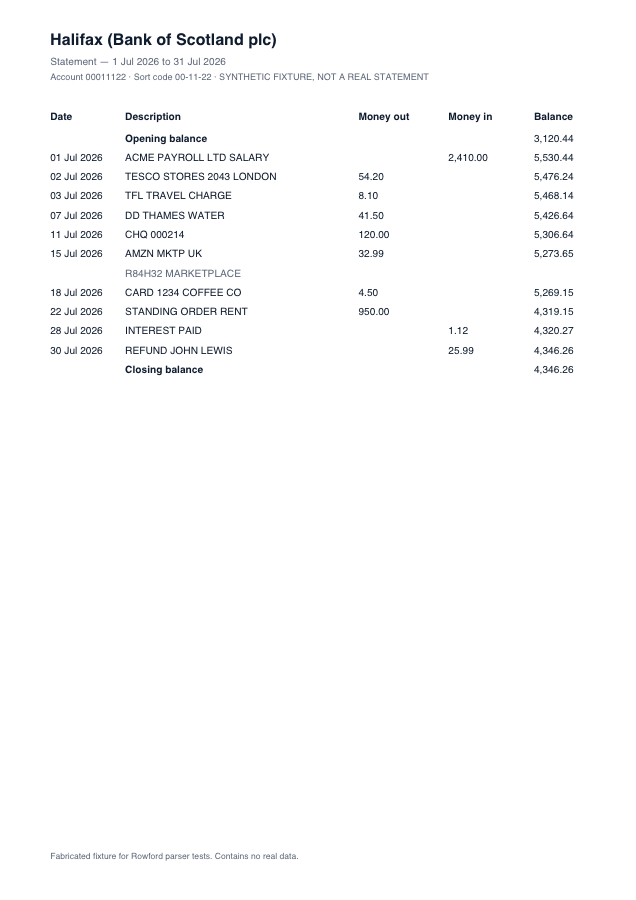
Halifax statements share the Lloyds Banking Group ledger style — Money out / Money in columns, running balance, dates like “07 Jul 2026” — but with Halifax’s own header phrasing and spacing. Rowford ships a distinct Halifax template so detection lands on the right name and the right vocabulary without leaning on lookalike layouts.
Full preview & reconciliation free · export from $39 one-time · nothing uploaded
How Rowford reads a Halifax statement
The Halifax template matches the columns as Halifax prints them — separate money-in and money-out columns folded into one signed amount for export:
DateDescriptionMoney outMoney inBalance
- Detected by Halifax’s own branding text, not inferred from the group layout — so the preview says what it actually parsed.
- Money out / Money in fold to signed amounts; continuation lines merge into their transactions.
- Reward payments and interest lines (money in with no reference) parse like any other credit and are verified against the running balance.
What ends up in your export
Date (re-formatted per target: dd/mm/yyyy for Xero, QuickBooks, Sage and FreeAgent), the full description as printed, the signed amount, and — in the generic CSV and Excel formats — the running balance. Every row carries a confidence score in the preview, and the whole statement must reconcile (opening + transactions = closing) before you rely on it. Deterministic, template-based extraction: the same statement produces the same output, every time.
Halifax questions
Which Halifax statements work?
PDF statements from Halifax online banking — Reward, Ultimate Reward and standard current accounts on the Money out / Money in layout. Scanned statements are declined.
Halifax is part of Lloyds Banking Group — does that matter?
Only in that the layouts are siblings. Rowford detects Halifax statements as Halifax, so template naming in the preview and reconciliation report matches the document in your hand.
Which export should I use for Sage?
The Sage preset: a headed Date, Description, Amount CSV with receipts positive and payments negative — the format Sage Accounting’s bank import maps directly.