Revolut Business · statement conversion
Convert Revolut Business bank statements to Excel, Xero or QuickBooks
Revolut Business GBP account statements print a Money out / Money in ledger with a running balance. Rowford’s template is aimed squarely at the GBP statements UK bookkeepers actually reconcile — multi-currency accounts export one statement per currency, and each GBP statement parses and reconciles on its own.
Full preview & reconciliation free · export from $39 one-time · nothing uploaded
How Rowford reads a Revolut Business statement
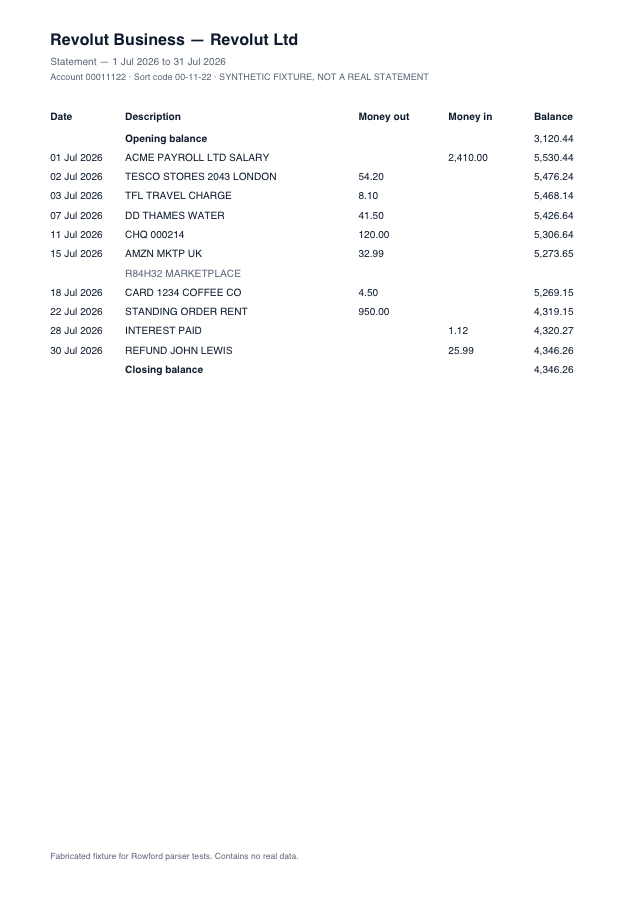
The Revolut Business template matches the columns as Revolut Business prints them — separate money-in and money-out columns folded into one signed amount for export:
DateDescriptionMoney outMoney inBalance
- Scope is deliberate: GBP account statements. A EUR or USD statement from the same Revolut Business account is a separate document — convert the GBP one for UK books.
- Money out / Money in fold into signed amounts; exchange and fee lines parse as ordinary transactions.
- Reference-heavy descriptions (invoice numbers, counterparty IBANs) are preserved verbatim except where a target format forbids specific characters.
What ends up in your export
Date (re-formatted per target: dd/mm/yyyy for Xero, QuickBooks, Sage and FreeAgent), the full description as printed, the signed amount, and — in the generic CSV and Excel formats — the running balance. Every row carries a confidence score in the preview, and the whole statement must reconcile (opening + transactions = closing) before you rely on it. Deterministic, template-based extraction: the same statement produces the same output, every time.
Revolut Business questions
Which Revolut statements work?
Revolut Business GBP account statements in PDF form with the Money out / Money in layout. Personal Revolut statements with the same ledger layout generally parse too, but the template and testing target Business.
What about multi-currency Revolut accounts?
Revolut issues statements per currency account. Convert the GBP statement for UK bookkeeping; other currencies are out of scope for v1 (as is currency conversion — Rowford never invents an exchange rate).
Are Revolut fees and FX lines included?
Yes — they print as transactions and are treated as transactions, reconciled against the running balance like everything else.